A three-month project with forty tasks is a list. The same project with five milestones is a path: you know where you are, what comes next and whether you're running late. The difference comes down to a few well-chosen checkpoints.
This guide explains what a milestone is, how to choose the right ones, with three concrete examples, and then how to set them up in a Flots project.
What is a project milestone?
A milestone is a key checkpoint in a project. It has no duration: it's a moment, not a period. Asana describes it as a zero-duration checkpoint that marks a key moment, whereas tasks take time.
A Project Management Institute article on milestone planning adds a useful nuance: a milestone should describe the state to reach, the result, and not the activity that leads to it. "Mockup approved" rather than "work on the mockup".
You work on tasks. You pass milestones.
How to choose the right milestones
A good milestone passes three tests.
It can be checked with a yes or a no. "Make progress on the website" can never be confirmed. "Copy for every page proofread" can be confirmed on a specific day. If two people could disagree on whether it's been reached, rephrase it.
It matches a deliverable or a decision. A document sent, an approval obtained, a booking confirmed. Something you can show.
It changes what happens next. A good milestone unlocks something: once the venue is booked, you can send the invitations. If it unlocks nothing, it's probably just a task.
| Vague wording | Verifiable milestone |
|---|---|
| Work on the mockup | Mockup approved by the client |
| Writing in progress | Full first draft sent to the supervisor |
| Prepare the event | Venue booked and deposit paid |
As for how many, aim for 4 to 8 milestones per project. It's a rule of thumb from experience. Three milestones leave long tunnels where you can't tell whether you're making progress. Fifteen end up looking like the task list and stop telling you anything. The last milestone is always the same: the project's final result.
Finally, spread them out. If four milestones fall in the last week, none of them will warn you in time.
Milestone examples for three typical projects
Launching a website
- Site structure and content listed
- Mockup approved
- Copy for every page proofread
- Full site live on a test address
- Mobile testing done
- Site published on the domain name
Writing a thesis
- Topic and research question approved by the supervisor
- Detailed outline approved
- Literature review written
- Full first draft sent
- Corrections made and proofreading done
- Thesis submitted
Organizing an event
- Date and budget set
- Venue booked
- Program approved
- Invitations sent
- Vendors confirmed (catering, equipment)
- Event day over and debrief shared
In each case, progress reads in one line: "we've passed milestone 3, number 4 is coming up". That's exactly what you want to be able to tell a client, a thesis supervisor or a team of volunteers.
Setting your project's milestones in Flots
In Flots, a project brings together the tasks, notes and milestones of a single subject. The project's milestones let you see the key checkpoints and the path still ahead to reach the finish line.
To set them up:
- Create the project with its final result as the finish line: "Studio website live", "Thesis submitted".
- Add the milestones in order, one for each checkpoint chosen with the method above. Keep the wording verifiable.
- Add the tasks that move the project forward, and the reference notes (brief, instructions, quote) in the same space.
- Reopen the project every week. At a glance, you see what's done, what comes next and what's left.
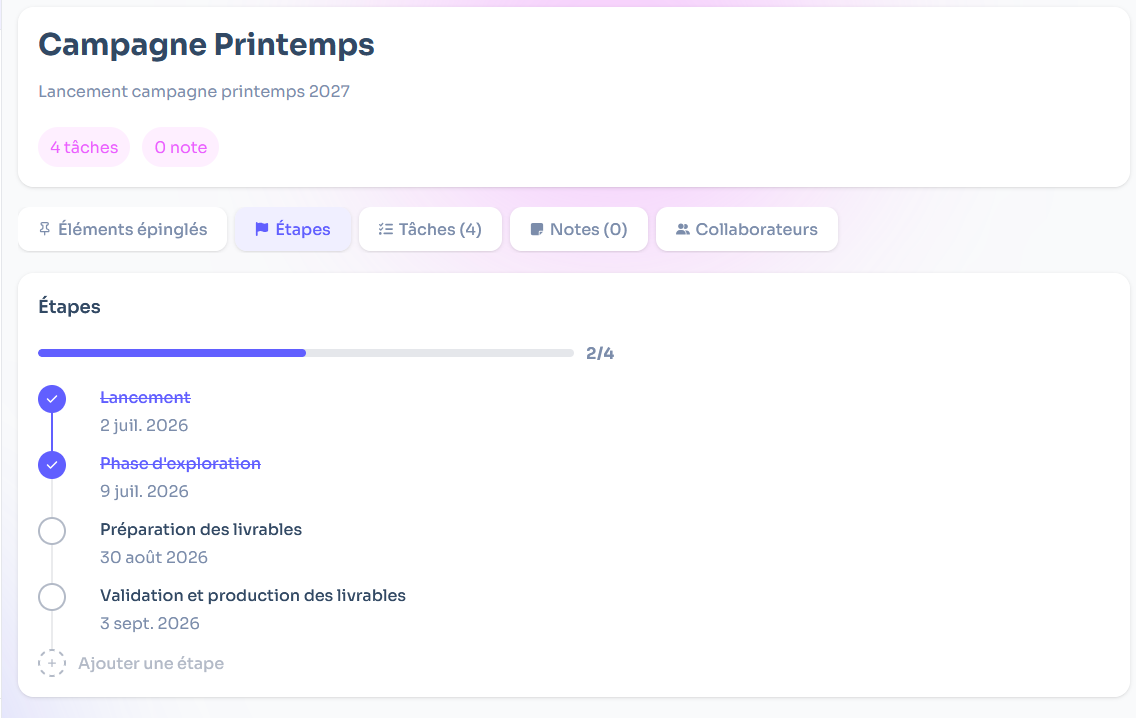
On a project run by several people, milestones give everyone the same reading of progress. No need for a meeting to find out where things stand: every milestone passed is visible, and the next one stands out clearly.
If your project has a fixed end date, backward planning helps you place these milestones by starting from the deadline and working back to today.
The mistakes that make milestones useless
- Naming activities. "Design phase" describes a period, not a checkpoint. Ask yourself what needs to exist at the end of that phase.
- Adding too many. If every task becomes a milestone, nothing stands out anymore. Keep milestones for the moments that matter.
- Never looking at them again. A milestone is there to spot a delay early. If it went by without being reached and nobody noticed, it served no purpose.
- Keeping a milestone that's no longer true. The project changes, and so do its milestones. Better to reword one than to follow a path that no longer exists.
Take the project that's keeping you busiest right now. Write down its final result, then the four or five checkpoints that lead to it, each one verifiable with a yes or a no. By next week, you'll know whether you're on schedule.
Set your project's milestones and see the path still ahead.